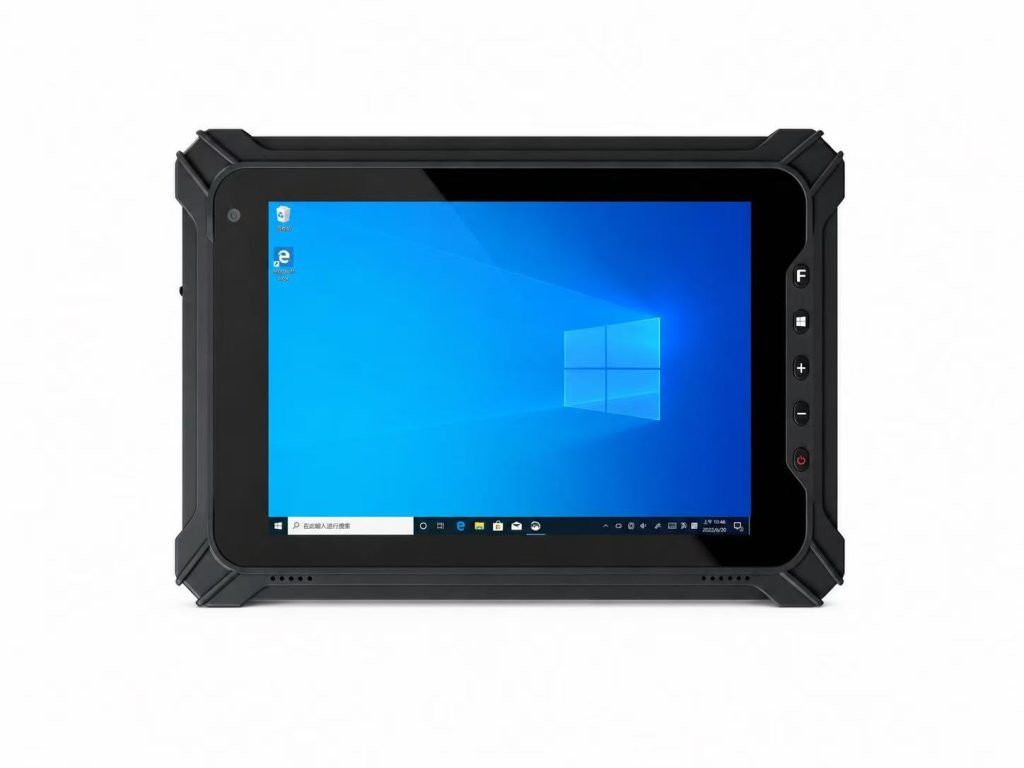
Rugged Tablet Battery Life Guide for Industrial Applications
Battery life is one of the most important factors when choosing a rugged tablet for industrial applications. Whether used in warehouses, logistics operations, manufacturing facilities, or field services, a reliable power solution helps employees work efficiently and reduces interruptions during daily operations.
However, rugged tablet battery life depends on more than battery capacity alone. Screen brightness, processor performance, wireless connectivity, operating temperature, and application workloads can all affect how long a device operates between charges.
In this guide, we explain the key factors affecting rugged tablet battery life, compare battery configurations, explore removable and hot-swappable battery options, and help industrial buyers select the right power solution for different work environments and shift requirements.
Part 1:Why Battery Life Matters in Industrial Applications
In industrial environments, rugged tablets are often used throughout an entire work shift for tasks such as inventory management, equipment inspections, production monitoring, and field data collection.
When a tablet runs out of power during critical operations, employees may need to interrupt their work, locate a charging station, or replace the device. These interruptions can reduce productivity and create unnecessary operational delays.
Choosing a rugged tablet with an appropriate battery solution helps businesses maintain workflow continuity, improve workforce efficiency, and support reliable daily operations.
1. Supporting Continuous Work Shifts
Industrial workers may depend on rugged tablets for an entire 8-hour shift or longer. In warehouses, manufacturing plants, and logistics centers, these devices are frequently used for scanning, data entry, equipment monitoring, and real-time communication.
A suitable battery configuration should support the expected working hours under actual operating conditions, with additional capacity available for unexpected delays or increased workloads.
For operations involving extended shifts, removable batteries, hot-swappable designs, or scheduled charging may help maintain device availability.
2.Reducing Downtime and Operational Interruptions
Unexpected battery depletion can interrupt industrial workflows, particularly when tablets are used for time-sensitive tasks such as order picking, delivery confirmation, production tracking, or maintenance inspections.
Frequent charging interruptions may also increase the number of spare devices required to maintain daily operations.
Selecting a rugged tablet with reliable battery performance and a practical charging strategy can help reduce these disruptions and improve overall device availability.
3. Improving Mobility in Demanding Environments
Many industrial applications require employees to work away from fixed power sources. Field technicians, delivery personnel, utility inspectors, and outdoor maintenance teams may spend several hours moving between locations.
In these situations, battery endurance becomes an important factor in device usability and operational planning.
Businesses should consider not only the advertised battery life but also real-world power consumption, environmental conditions, charging accessibility, and the availability of replacement batteries.
How Battery Life Impacts Industrial Operations
| Industrial Application | Battery Challenge | Recommended Strategy |
|---|---|---|
| Warehouse Management | Continuous scanning and data entry during shifts | Shift-ready battery capacity and accessible charging |
| Manufacturing | Long operating hours and continuous monitoring | Reliable runtime and planned charging intervals |
| Logistics & Delivery | Mobile operations with limited charging access | Extended battery capacity or vehicle charging |
| Field Service | Outdoor work away from fixed power sources | Spare batteries or compatible portable charging |
Quick Recommendation
For industrial applications, rugged tablet battery life should be evaluated based on actual work shifts, operating conditions, and charging accessibility—not advertised runtime alone.
Choose a battery solution that supports continuous operations, minimizes unexpected downtime, and provides sufficient flexibility for extended shifts. For mobile or remote work environments, consider removable batteries, hot-swappable options, or compatible charging accessories where available.

Part 2:What Determines Rugged Tablet Battery Life?
Rugged tablet battery life is influenced by several factors beyond the battery’s rated capacity. Two devices with similar battery specifications may deliver different operating times depending on their hardware configurations, software workloads, and working environments.
For industrial users, screen brightness, processor activity, wireless connectivity, peripheral devices, and operating temperature can significantly affect real-world battery performance.
Understanding these factors helps businesses estimate practical runtime, select suitable battery configurations, and plan charging strategies for different industrial applications.
1. Battery Capacity and Power Consumption
Battery capacity is one of the primary factors affecting rugged tablet runtime. It is commonly expressed in milliampere-hours (mAh) or watt-hours (Wh), although watt-hours provide a more useful basis for comparing batteries with different voltages.
A larger battery generally stores more energy, but it does not automatically guarantee longer operating time. Actual runtime also depends on how efficiently the tablet uses power.
For example, a rugged tablet with a high-performance processor and a bright display may consume more energy than a lower-power device, even when both have similar battery capacities.
When comparing rugged tablets, buyers should review battery energy capacity, typical power consumption, and runtime measured under clearly defined test conditions.
2. Screen Brightness and Display Settings
The display is often a significant source of power consumption in a rugged tablet, particularly when the screen operates at high brightness for extended periods.
Industrial tablets used outdoors may require high-brightness displays to maintain visibility under strong sunlight. However, operating the display at maximum brightness can reduce battery runtime.
Automatic brightness adjustment, appropriate screen timeout settings, and efficient display configurations can help balance visibility and power consumption.
For applications involving long work shifts, businesses should evaluate battery performance at the brightness levels employees will actually use rather than relying only on laboratory runtime claims.
3. Processor Performance and Application Workloads
Processor activity and software workloads also influence rugged tablet battery life.
Basic tasks such as inventory updates, form entry, and barcode data collection may require less processing power than continuous video streaming, complex mapping, or resource-intensive industrial applications.
Background applications, frequent synchronization, and poorly optimized software can further increase power consumption.
For industrial deployments, selecting an appropriate processor and optimizing application performance can help improve energy efficiency without compromising essential functionality.
4. Wireless Connectivity and Peripheral Devices
Wireless communication features such as Wi-Fi, Bluetooth, cellular connectivity, and GPS can affect rugged tablet power consumption.
Continuous data transmission, weak network signals, frequent location updates, and connected peripherals may increase battery usage during daily operations.
Accessories such as barcode scanners, RFID readers, external sensors, and USB devices may also draw additional power, depending on their design and operating mode.
Businesses should test battery runtime with the actual wireless connections and peripherals required for their applications, especially when devices are used continuously throughout a work shift.
5. Operating Temperature and Battery Health
Industrial environments can expose rugged tablets to temperature conditions that affect battery performance.
Cold temperatures may temporarily reduce available battery capacity and shorten runtime, while excessive heat can accelerate battery aging and reduce long-term performance.
Battery condition also changes over time as charging cycles, storage conditions, and daily usage contribute to gradual capacity loss.
For warehouses, outdoor operations, and other demanding environments, buyers should review the manufacturer’s specified operating and charging temperature ranges and follow recommended battery maintenance procedures.
A rugged tablet’s environmental protection rating should not be interpreted as a guarantee that its battery will deliver the same runtime under all temperature conditions.
Key Factors Affecting Rugged Tablet Battery Life
| Factor | Impact on Battery Life | Optimization Strategy |
|---|---|---|
| Battery Capacity | Higher energy capacity can support longer runtime | Compare Wh ratings and verified runtime |
| Screen Brightness | Higher brightness generally increases power use | Adjust brightness to actual working conditions |
| Processor & Software | Intensive workloads can increase energy consumption | Optimize applications and background processes |
| Wireless Connectivity | Continuous communication may reduce runtime | Manage unused connections and network activity |
| Peripheral Devices | Connected accessories may draw additional power | Test with required scanners and accessories |
| Temperature & Battery Health | Extreme conditions and aging can reduce capacity | Follow operating limits and battery care guidance |

Quick Recommendation
When comparing rugged tablet battery life, do not rely on battery capacity or advertised runtime alone.
Evaluate the complete device configuration, including display brightness, processor workload, wireless connectivity, connected peripherals, and operating temperature. Whenever possible, request battery runtime test results under conditions similar to your actual industrial application.
A well-matched hardware configuration and practical power management strategy can help deliver more predictable battery performance throughout daily operations.
Part 3:How Long Should a Rugged Tablet Battery Last?
The ideal rugged tablet battery life depends on the length of the work shift, the intensity of device usage, and the availability of charging facilities.
For industrial applications, businesses should evaluate whether a tablet can reliably support an 8-hour, 10-hour, or 12-hour shift under realistic operating conditions. A device that performs well during occasional data entry may deliver shorter runtime when continuously running barcode scanning, GPS navigation, wireless communication, or high-brightness displays.
Instead of selecting a tablet based only on advertised battery life, industrial buyers should consider actual operating hours, workload requirements, and a practical charging or battery replacement strategy.
1. Battery Life for an 8-Hour Work Shift
An 8-hour work shift is common in warehouse management, manufacturing operations, and industrial inspections.
For these applications, a rugged tablet should ideally provide enough battery capacity to support the entire shift without requiring frequent charging interruptions.
However, an advertised 8-hour battery life does not necessarily guarantee 8 hours of continuous industrial operation. Actual runtime can vary depending on screen brightness, application workloads, wireless connectivity, and connected peripherals.
Businesses should test the device using their actual software and working conditions, preferably with additional runtime margin to accommodate unexpected delays or heavier workloads.
2. Battery Life for a 10-Hour Work Shift
Some logistics, transportation, field service, and industrial maintenance operations require employees to work for approximately 10 hours per shift.
In these environments, battery planning becomes more important because workers may not have regular access to charging stations.
A rugged tablet with extended battery capacity may be suitable, but buyers should also consider power-saving settings, scheduled charging breaks, vehicle charging, and compatible spare batteries.
The best solution depends on whether the device is used continuously or intermittently throughout the shift.
3. Battery Life for a 12-Hour or Extended Work Shift
Extended shifts are common in certain manufacturing facilities, logistics operations, utility services, and field maintenance projects.
For 12-hour shifts or longer, relying on a single battery may not always be practical, particularly when rugged tablets operate at high brightness or run demanding applications.
Businesses may benefit from high-capacity battery options, removable batteries, hot-swappable designs, or reliable charging arrangements.
When evaluating these solutions, buyers should confirm whether battery replacement requires shutting down the device and whether the selected rugged tablet model supports uninterrupted operation during a battery swap.
4. Why Real-World Battery Runtime May Differ
Battery runtime figures published by manufacturers are typically measured under specific test conditions. These conditions may differ from the way rugged tablets are used in industrial environments.
High screen brightness, continuous Wi-Fi or cellular communication, GPS navigation, barcode scanning, background synchronization, and demanding applications can increase power consumption.
Operating temperature and battery aging may also affect available runtime.
For a reliable evaluation, industrial buyers should request information about battery testing conditions and perform application-based testing before large-scale deployment.
Rugged Tablet Battery Planning by Work Shift
| Work Shift | Typical Application | Battery Planning Priority | Recommended Strategy |
|---|---|---|---|
| 8 Hours | Warehousing and manufacturing | Full-shift operation with a runtime margin | Verify runtime under actual workloads |
| 10 Hours | Logistics and field service | Extended runtime and charging access | Consider spare batteries or vehicle charging |
| 12+ Hours | Industrial maintenance and extended operations | Reliable power throughout long shifts | Evaluate removable or hot-swappable batteries |
| Multiple Shifts | Continuous warehouse or production operations | Device availability between operators | Plan battery rotation, charging docks, or spare devices |
Note: These are battery planning scenarios, not guaranteed runtime specifications. Actual battery performance depends on device configuration, workload, and operating conditions.

Battery requirements vary across different industrial applications. Explore our rugged industrial tablets to find suitable devices for warehouse management, logistics, and field operations.
Quick Recommendation
Choose rugged tablet battery solutions based on actual work shift requirements rather than advertised runtime alone.
For standard 8-hour shifts, verify that the device can complete a full working day with a reasonable power reserve. For 10-hour or 12-hour shifts, consider extended-capacity batteries, scheduled charging, or compatible removable and hot-swappable battery options.
Before deployment, test the rugged tablet under realistic application workloads, display brightness, wireless connectivity, and environmental conditions to ensure reliable daily operation.
Part 4:Battery Capacity vs Actual Runtime: Understanding mAh and Wh
When comparing rugged tablet battery life, many buyers focus on battery capacity figures such as 5,000mAh, 8,000mAh, or 10,000mAh. However, a larger mAh rating does not always mean a tablet will operate longer.
Battery runtime depends on both the amount of energy stored in the battery and how much power the device consumes during operation. Two rugged tablets with different processors, displays, and wireless configurations may deliver very different runtimes even when their batteries have similar capacity ratings.
Understanding the relationship between milliampere-hours (mAh), watt-hours (Wh), and power consumption helps industrial buyers make more accurate battery comparisons and select devices that meet real-world working requirements.
1. What Does mAh Mean in a Rugged Tablet Battery?
Milliampere-hours (mAh) describe a battery’s electric charge capacity. This rating is commonly used in rugged tablet specifications and indicates how much charge the battery can deliver over time under specified conditions.
For example, a battery rated at 10,000mAh has twice the charge capacity of a 5,000mAh battery. However, this comparison does not necessarily mean it stores twice as much energy unless both batteries operate at the same nominal voltage.
A rugged tablet battery’s voltage is therefore an important factor when comparing capacity specifications across different devices.
For industrial buyers, mAh is useful information, but it should not be treated as a direct measurement of battery runtime.
2. Why Watt-Hours (Wh) Matter More Than mAh
Watt-hours (Wh) measure the amount of energy a battery can store. Unlike mAh, watt-hours account for both battery capacity and nominal voltage, making them more useful for comparing batteries with different electrical configurations.
For example, a 5,000mAh battery rated at 7.4V stores approximately 37Wh of energy, while a 10,000mAh battery rated at 3.7V also stores approximately 37Wh.
Although the second battery has twice the mAh rating, both batteries have approximately the same energy capacity.
When reviewing rugged tablet specifications, industrial buyers should compare watt-hour ratings whenever possible and confirm the nominal battery voltage if only mAh is provided.
Battery Energy Formula
Wh = (mAh × Voltage) ÷ 1000
Example: 5,000mAh × 7.4V ÷ 1,000 = 37Wh
3. How to Estimate Rugged Tablet Battery Runtime
A simplified way to estimate rugged tablet battery runtime is to divide the battery’s energy capacity in watt-hours by the device’s average power consumption in watts.
For example, a rugged tablet with a 40Wh battery and an average power consumption of 5W has a theoretical runtime of approximately 8 hours.
However, this calculation is only an estimate. Actual operating time may be shorter because of battery discharge characteristics, changing workloads, temperature conditions, battery aging, and other system-level factors.
For more reliable planning, buyers should measure or request average power consumption data under workloads that reflect their intended applications.
Estimated Battery Runtime
Runtime (hours) ≈ Battery Energy (Wh) ÷ Average Power (W)
Example: 40Wh ÷ 5W = approximately 8 hours (theoretical estimate).
For additional background on battery technologies and energy storage, refer to the U.S. Department of Energy’s battery resources.
4. Why Higher Battery Capacity Does Not Always Mean Longer Runtime
A larger battery can provide more stored energy, but rugged tablet runtime is also influenced by the device’s power requirements.
A tablet with a high-brightness display, powerful processor, continuous cellular connectivity, and multiple connected peripherals may consume significantly more energy than a device used primarily for basic data entry.
As a result, a rugged tablet with a larger battery may still have a shorter runtime than a more energy-efficient model with a smaller battery.
This is why battery specifications should always be evaluated together with device configuration, application workloads, and real-world testing conditions.
5. How to Compare Battery Specifications Before Buying
When comparing rugged tablets for industrial projects, buyers should request complete battery specifications rather than relying on a single capacity figure.
Important details include battery capacity in Wh, nominal voltage, battery chemistry, manufacturer-rated runtime, test conditions, charging time, and whether the battery is removable or replaceable.
It is also useful to confirm whether extended-capacity batteries, spare batteries, charging docks, or vehicle charging accessories are available for the selected model.
For large deployments, testing sample devices with actual software, screen brightness, network connections, and peripherals can provide a more realistic assessment of battery performance.
Battery Capacity and Estimated Runtime Comparison
| Battery Capacity | Average Power | Theoretical Runtime | Planning Consideration |
|---|---|---|---|
| 30Wh | 5W | 6 Hours | May require charging during longer shifts |
| 40Wh | 5W | 8 Hours | Evaluate runtime margin for 8-hour shifts |
| 50Wh | 5W | 10 Hours | Potentially suitable for extended shifts after testing |
| 60Wh | 5W | 12 Hours | Verify sustained performance under actual workloads |
| 40Wh | 8W | 5 Hours | Higher power use can significantly reduce runtime |
Note: All runtime values are theoretical estimates calculated as battery energy divided by assumed average power consumption. They are not measured product specifications. Actual runtime depends on device efficiency, workload, temperature, and battery condition.

Quick Recommendation
When comparing rugged tablet batteries, prioritize watt-hours (Wh), average power consumption, and verified operating conditions rather than mAh ratings alone.
A higher battery capacity does not automatically guarantee longer runtime if the device consumes more power. For industrial deployments, request detailed battery specifications and test sample devices under realistic workloads before making purchasing decisions.
The most suitable battery solution is one that provides sufficient operating time, reliable performance, and practical charging options for your specific application.
Part 5:Removable vs Built-In Batteries: Which Is Better for Industrial Use?
When selecting a rugged tablet for industrial applications, battery design is just as important as battery capacity and runtime. Two common options are removable batteries and built-in batteries, each offering different advantages for daily operations, maintenance, and long-term device management.
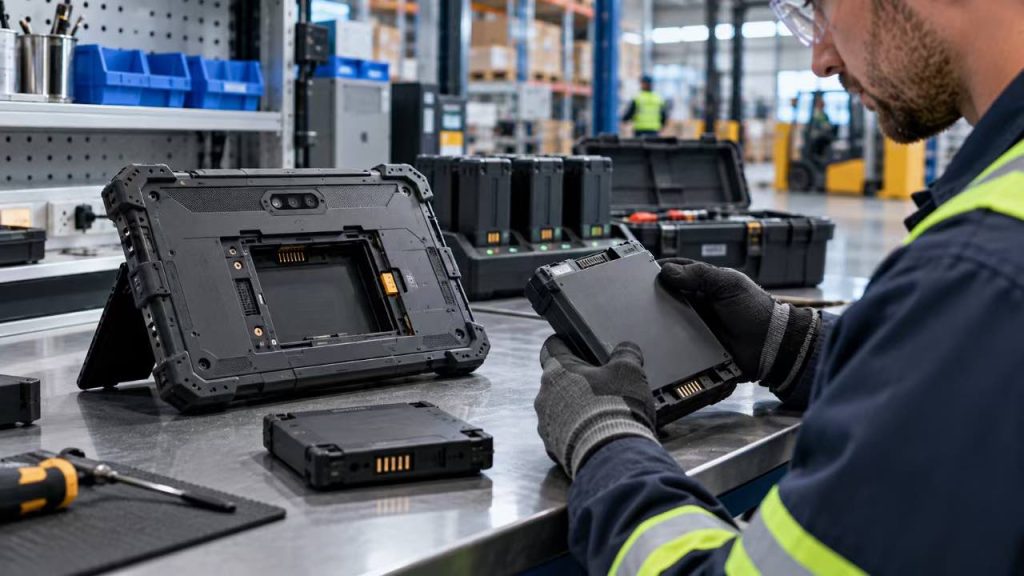
Removable batteries allow authorized users to replace a battery without opening the tablet’s main enclosure, while built-in batteries are typically designed to remain inside the device during normal operation.
For warehouses, logistics companies, manufacturing facilities, and field service teams, understanding these differences can help reduce operational interruptions and improve long-term equipment planning.
1. What Is a Removable Rugged Tablet Battery?
A removable rugged tablet battery is designed to be detached and replaced using a manufacturer-approved procedure, typically without disassembling the tablet’s main enclosure.
This design allows businesses to keep compatible spare batteries available for longer work shifts or situations where charging access is limited.
Removable batteries are particularly useful in applications where employees need to operate tablets for extended periods, such as warehouse management, logistics, field inspections, and industrial maintenance.
However, removable does not automatically mean hot-swappable. Some rugged tablets must be powered off before the battery can be replaced, while others support battery replacement without interrupting operation.
2. What Is a Built-In Rugged Tablet Battery?
A built-in rugged tablet battery is installed inside the device and is not intended to be removed by the user during normal operation.
This configuration can support an integrated enclosure design and may simplify certain aspects of device construction. However, overall durability, thickness, and environmental protection depend on the complete product design rather than battery placement alone.
Built-in batteries can be suitable for industrial applications where charging stations are readily available or where tablets are used intermittently throughout the day.
When the battery eventually requires replacement, servicing may involve an authorized technician or manufacturer-approved maintenance procedure, depending on the model.
3. Advantages of Removable Batteries for Industrial Operations
Removable batteries can provide greater operational flexibility for industrial teams that rely on mobile devices throughout long work shifts.
By keeping compatible spare batteries charged and ready, businesses may reduce the need to leave tablets connected to charging stations for extended periods.
Removable battery designs can also simplify certain maintenance tasks, particularly when aging batteries need to be replaced during a device’s service life.
For organizations managing large fleets of rugged tablets, spare battery availability, charging accessories, replacement procedures, and long-term battery supply should all be considered when evaluating the total cost of ownership.
Battery replacement must follow the manufacturer’s instructions to maintain safe operation and preserve the device’s intended environmental protection.
4. Advantages and Limitations of Built-In Batteries
Built-in batteries can be a practical choice for rugged tablets used in environments with predictable operating schedules and convenient access to charging facilities.
Because the battery remains inside the enclosure during normal use, employees do not need to handle separate battery modules or manage battery replacement during daily operations.
However, built-in battery designs generally provide less flexibility when a tablet runs out of power away from a charging source.
Battery servicing may also require additional downtime if replacement cannot be performed by the end user.
Before purchasing, industrial buyers should confirm battery serviceability, expected replacement procedures, warranty conditions, and available charging accessories.
5. How to Choose the Right Battery Design
The best battery design depends on how the rugged tablet will be used, how long employees need to operate it, and how easily devices can be recharged or serviced.
For warehouse operations with multiple shifts, removable batteries may offer greater flexibility when spare batteries and charging stations are properly managed.
For vehicle-mounted systems or fixed industrial workstations, a built-in battery may be sufficient when compatible external power is available.
For outdoor field service, utility inspections, and remote operations, removable batteries can be valuable when access to charging infrastructure is limited.
Regardless of the battery design, buyers should verify actual runtime, charging compatibility, replacement procedures, environmental protection requirements, and long-term spare parts availability before deployment.
Removable vs Built-In Rugged Tablet Batteries
| Comparison | Removable Battery | Built-In Battery |
|---|---|---|
| Battery Replacement | User-replaceable using an approved procedure | Typically requires a service procedure |
| Extended Shifts | Can use compatible spare batteries | Usually relies on charging access |
| Operational Flexibility | Greater flexibility for mobile work | Suitable for predictable charging schedules |
| Maintenance | Battery replacement may be simpler | May require authorized servicing |
| Charging Strategy | Device charging or separate battery charging | Typically charges through the device |
| Hot-Swap Support | Available only on specifically designed models | Not normally user-swappable |
| Typical Applications | Warehousing, logistics, field service | Fixed workstations, vehicle-mounted use |
Note: Battery features vary by model. Removable batteries are not necessarily hot-swappable. Always verify approved replacement procedures, charging compatibility, and environmental protection requirements with the manufacturer.
Quick Recommendation
For industrial operations requiring long work shifts and limited charging access, removable batteries can provide greater flexibility by allowing compatible spare batteries to be used when needed.
Built-in batteries may be suitable for applications with predictable charging schedules and convenient access to external power.
Before choosing either design, evaluate actual battery runtime, replacement procedures, charging options, environmental protection, and long-term maintenance requirements. If uninterrupted battery replacement is essential, confirm that the specific rugged tablet model supports true hot-swapping.
Part 6:ot-Swappable Batteries and Charging Solutions for Rugged Tablets
For industrial operations that rely on rugged tablets throughout the working day, battery charging and replacement strategies can be just as important as battery capacity. In warehouses, manufacturing facilities, logistics operations, and field service environments, unexpected battery depletion can interrupt workflows and reduce productivity.
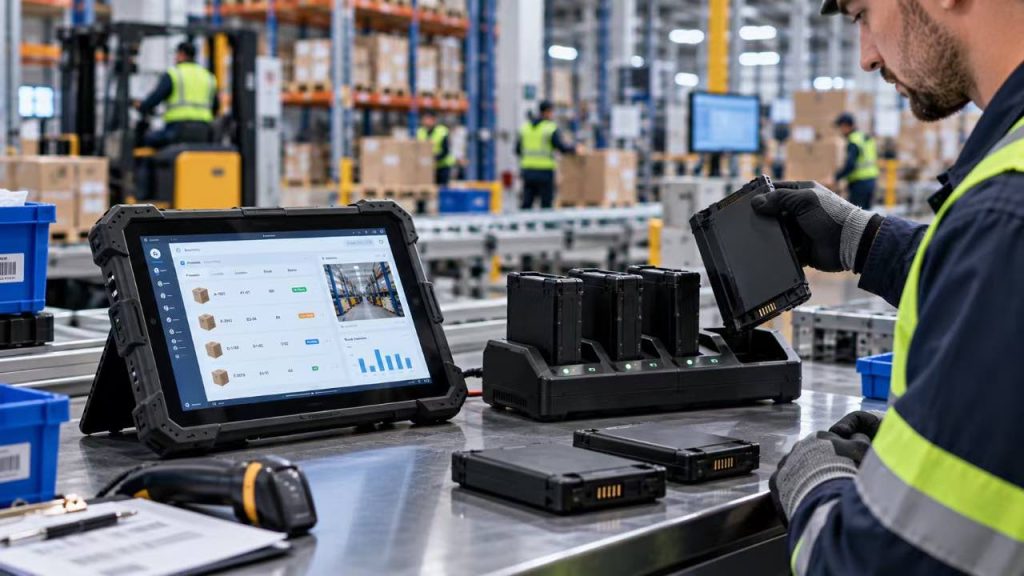
Hot-swappable batteries offer a potential solution by allowing compatible batteries to be replaced without shutting down the rugged tablet. Combined with spare battery chargers, docking stations, and external power options, they can help businesses maintain device availability across demanding work schedules.
However, not every rugged tablet with a removable battery supports hot-swapping. Industrial buyers should understand the differences between battery replacement technologies and evaluate charging accessories before selecting a device for long-term deployment.
1. What Is a Hot-Swappable Battery in a Rugged Tablet?
A hot-swappable battery is a removable battery that can be replaced while a compatible rugged tablet remains powered on, without requiring a normal system shutdown.
Depending on the device design, hot-swapping may be supported by an internal backup battery, a secondary power source, or another manufacturer-designed power management system.
During battery replacement, the tablet may temporarily rely on its backup power source to preserve the operating session and prevent interruption to active applications.
It is important to distinguish hot-swappable batteries from standard removable batteries. A removable battery can be physically replaced, but the tablet may still need to be powered off before the battery is removed.
Before purchasing, buyers should verify the manufacturer’s hot-swap specifications, supported replacement procedure, and any limitations on how long the device can operate without its main battery.
2. How Hot-Swappable Batteries Reduce Industrial Downtime
Hot-swappable battery systems can help reduce interruptions in industrial environments where rugged tablets are used continuously throughout the day.
For warehouse workers, replacing a depleted battery with a charged spare may allow inventory scanning, order processing, and warehouse management applications to continue without a full device restart.
In manufacturing facilities, hot-swappable batteries can help technicians maintain access to inspection records, production dashboards, and maintenance applications during extended shifts.
For field service teams, the ability to replace a battery without shutting down the device may be especially useful when working away from fixed charging stations.
Actual continuity depends on the tablet’s power management design, available backup power, and correct battery replacement procedures. Buyers should verify these capabilities through product documentation and practical testing.
3. Spare Battery Chargers and Multi-Bay Charging Docks
Spare battery chargers and multi-bay charging docks can support efficient battery management for businesses operating multiple rugged tablets.
A dedicated battery charger allows compatible removable batteries to be charged separately from the tablet, helping organizations maintain a supply of ready-to-use spare batteries.
Multi-bay charging docks can be useful in warehouses, distribution centers, and manufacturing facilities where several employees share devices or work across multiple shifts.
When planning a charging station, businesses should consider the number of devices, charging time, spare battery requirements, available electrical capacity, and safe battery storage procedures.
Buyers should also confirm that charging accessories are approved for the specific rugged tablet battery model and comply with the manufacturer’s operating instructions.
4. Vehicle Charging and External Power Solutions
For logistics, transportation, and mobile field operations, vehicle charging and external power accessories can help extend the practical availability of rugged tablets.
Compatible vehicle chargers and powered docking stations may allow tablets to receive power while installed in delivery vehicles, forklifts, service trucks, or other mobile work environments.
In manufacturing facilities, powered docks can support tablets used at inspection stations, production workstations, or equipment monitoring locations.
External power solutions may reduce reliance on battery capacity alone, especially when tablets are used for long periods in fixed or vehicle-mounted positions.
However, power input requirements, connector compatibility, voltage regulation, mounting safety, and environmental conditions should be verified before deployment. Not all rugged tablets support the same charging accessories or power configurations.
5. How to Plan Battery Charging for Multiple Work Shifts
A reliable battery management strategy should account for the number of rugged tablets in use, the duration of each work shift, and the availability of charging infrastructure.
For single-shift operations, a tablet with sufficient verified runtime may only require scheduled charging between working periods.
For two-shift or three-shift operations, spare batteries, approved charging docks, and hot-swappable battery systems may provide greater flexibility when supported by the selected device.
Organizations should establish procedures for identifying charged batteries, rotating spare batteries, inspecting battery condition, and replacing batteries that no longer meet operational requirements.
Before a large deployment, industrial buyers should test their charging strategy under realistic workloads and confirm that the selected combination of tablets, batteries, chargers, and accessories can support daily operations without unnecessary interruptions.
Rugged Tablet Battery and Charging Solutions Comparison
| Solution | Main Advantage | Typical Application | Key Consideration |
|---|---|---|---|
| Hot-Swappable Battery | Battery replacement without a normal shutdown | Multi-shift warehousing and field service | Requires verified hot-swap support |
| Removable Spare Battery | Additional portable energy for extended use | Outdoor inspections and mobile work | Device may require shutdown |
| Single Battery Charger | Charges a compatible battery separately | Small teams and individual technicians | Charging time and compatibility |
| Multi-Bay Charging Dock | Supports centralized charging of multiple batteries | Warehouses and distribution centers | Charging capacity and battery management |
| Vehicle Charger | Provides power during vehicle-based operations | Logistics, transportation and field service | Vehicle power and connector compatibility |
| Powered Docking Station | Provides power at a workstation or mounting location | Manufacturing and vehicle-mounted systems | Dock compatibility and installation |
Note: Availability and capabilities vary by rugged tablet model. Hot-swapping, spare battery charging, vehicle power, and docking accessories must be verified for the specific device and battery configuration.
Quick Recommendation
For industrial operations that require continuous device availability, consider rugged tablets with verified hot-swappable battery support and a practical spare battery management system.
Multi-bay charging docks can help warehouse and manufacturing teams organize spare batteries, while compatible vehicle chargers and powered docking stations may provide additional flexibility for mobile and fixed-position applications.
Before deployment, confirm battery replacement procedures, backup power limitations, charging accessory compatibility, and actual runtime under normal working conditions. A well-planned charging strategy can be as important as battery capacity in reducing operational downtime.
Part 7:How to Extend Rugged Tablet Battery Life in Industrial Environments
Extending rugged tablet battery life is not only about choosing a larger battery. In industrial environments, daily operating settings, application workloads, wireless connectivity, and charging practices can significantly influence how long a device remains available during a work shift.
By optimizing power consumption and maintaining battery health, businesses can improve practical battery runtime without unnecessarily compromising essential workflows.
The following strategies can help warehouse operators, manufacturing teams, logistics companies, and field service professionals manage rugged tablet power consumption more effectively.
1. Optimize Screen Brightness and Display Settings
The display is often a major source of power consumption in a rugged tablet, particularly when a high-brightness screen is used for outdoor visibility.
Reducing screen brightness to the lowest comfortable and safe level can help conserve battery energy during indoor operations. For outdoor work, higher brightness may still be necessary to maintain screen readability.
Automatic brightness adjustment, when supported, can help balance visibility and power consumption as lighting conditions change.
Businesses should also consider reducing screen timeout duration so the display turns off when the device is not actively being used, provided this does not interrupt essential work tasks.
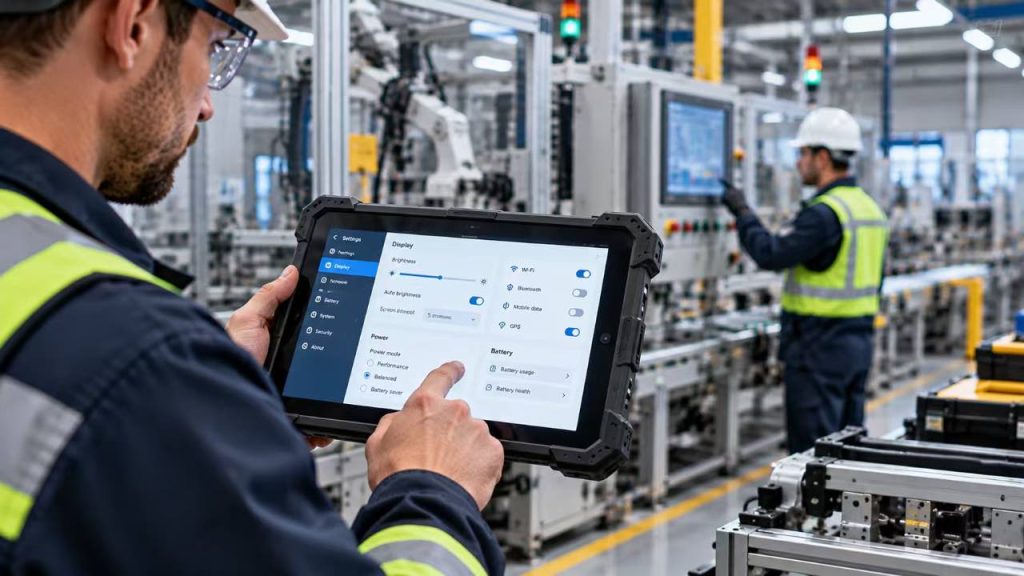
2. Use Power Management Settings Effectively
Many rugged tablets provide operating system power settings that allow users or IT administrators to balance performance and battery efficiency.
Power-saving modes may reduce unnecessary processor activity, adjust display behavior, or limit selected background operations.
For warehouse data entry, inventory management, and routine inspections, a balanced power profile may provide sufficient performance while reducing energy consumption.
However, aggressive power-saving settings should be tested carefully before deployment. Critical applications, real-time monitoring, alarms, and wireless communication may require uninterrupted background operation.
The most effective approach is to configure power settings according to actual industrial workloads rather than applying the same power-saving profile to every device.
3. Manage Wireless Connectivity and Connected Devices
Wireless communication and connected peripherals can contribute to rugged tablet power consumption, especially when devices operate continuously throughout a work shift.
Wi-Fi, cellular connectivity, Bluetooth, GPS, and external accessories may increase energy demand depending on how frequently they are used and how the device manages each connection.
Where operationally appropriate, disabling unused wireless functions can help reduce unnecessary power consumption.
For example, a rugged tablet used at a fixed indoor workstation may not require continuous GPS operation, while a field service device may depend on GPS and cellular connectivity for essential tasks.
Businesses should avoid disabling communication functions that are necessary for safety, location tracking, data synchronization, or workflow continuity.
4. Reduce Unnecessary Background Applications
Background applications can consume processor resources, network bandwidth, and battery energy even when employees are not actively interacting with them.
In industrial environments, rugged tablets may run warehouse management software, inventory scanning applications, maintenance platforms, and device management tools.
IT administrators should review installed applications and identify unnecessary background processes, excessive synchronization intervals, or nonessential notifications.
Where appropriate, reducing unnecessary application activity can help improve power efficiency.
However, essential background services such as device security, remote management, safety alerts, and business-critical data synchronization should remain enabled according to operational requirements.
5. Maintain Battery Health and Charging Practices
Battery condition can influence rugged tablet runtime over time. As rechargeable batteries age, their usable capacity generally decreases, which may reduce the amount of operating time available from a full charge.
To support battery health, businesses should follow the manufacturer’s charging, storage, and temperature recommendations.
Avoiding unnecessary exposure to extreme heat, using approved chargers, and inspecting removable batteries for damage can help support safer and more reliable operation.
For organizations managing multiple rugged tablets, periodic battery health checks and planned battery replacement procedures can reduce unexpected operational interruptions.
If a battery becomes swollen, damaged, unusually hot, or otherwise abnormal, it should be removed from service according to the manufacturer’s safety guidance rather than continuing normal use.
6. Test and Monitor Battery Performance Regularly
Battery optimization should be supported by practical testing rather than relying only on manufacturer-rated runtime.
Businesses can evaluate rugged tablet battery performance using typical screen brightness, wireless connections, installed applications, and peripheral devices.
Recording battery runtime across different work shifts can help identify changes in power consumption, battery condition, or application behavior.
For larger deployments, compatible device management and diagnostic tools may help IT teams monitor battery health and identify devices that require maintenance.
Regular testing allows organizations to adjust power settings, charging schedules, and battery replacement plans based on actual operating requirements.
Practical Ways to Improve Rugged Tablet Battery Life
| Optimization Method | Recommended Action | Potential Benefit | Key Consideration |
|---|---|---|---|
| Screen Brightness | Use appropriate brightness and screen timeout settings | Reduce unnecessary display power consumption | Maintain visibility and workplace safety |
| Power Management | Configure balanced or workload-specific power profiles | Improve energy efficiency | Protect critical application performance |
| Wireless Connectivity | Disable unused connections where appropriate | Reduce unnecessary wireless activity | Keep essential communication enabled |
| Background Applications | Limit unnecessary processes and synchronization | Lower avoidable processor and network activity | Preserve security and essential services |
| Battery Maintenance | Follow approved charging and storage procedures | Support long-term battery reliability | Inspect batteries and avoid excessive heat |
| Performance Monitoring | Test runtime under realistic workloads | Identify battery and power consumption issues | Compare results using consistent conditions |
Note: Actual battery savings vary by rugged tablet model, operating system, application workload, wireless configuration, and environmental conditions. Power optimization should not compromise safety-critical functions or essential industrial workflows.
Quick Recommendation
To extend rugged tablet battery life, start by optimizing screen brightness, power management settings, wireless connectivity, and unnecessary background activity without disrupting essential industrial applications.
Follow manufacturer-approved charging and battery maintenance procedures to support long-term reliability, especially in demanding environments.
For business-critical deployments, test battery runtime under realistic working conditions and review battery performance regularly. Effective power management combines appropriate device settings, healthy batteries, and a charging strategy matched to daily operational requirements.
Part 8:Rugged Tablet Battery Requirements by Industrial Application
Rugged tablet battery requirements vary significantly across industrial applications. A tablet used for warehouse inventory management may have different power demands from one used for outdoor utility inspections, vehicle-based logistics, or continuous production monitoring.
Factors such as work shift duration, screen brightness, wireless connectivity, connected peripherals, environmental temperature, and charging access all influence the battery solution required for reliable operation.
Understanding these application-specific requirements helps industrial buyers select rugged tablets with appropriate battery capacity, charging accessories, and power management features rather than relying on advertised battery life alone.
1. Warehouse Management and Inventory Operations
In warehouses and distribution centers, rugged tablets are commonly used for inventory management, barcode scanning, order picking, stock verification, and warehouse management system (WMS) applications.
These workflows often involve continuous Wi-Fi connectivity, frequent screen interaction, and repeated scanning throughout an employee’s shift. Battery requirements therefore depend on the length of the workday and the intensity of device usage.
For standard shifts, businesses should verify that the selected rugged tablet can complete the required operating period with an appropriate power reserve.
For multi-shift warehouse operations, removable batteries, verified hot-swappable battery systems, and compatible multi-bay charging docks may help reduce charging-related interruptions.
Warehouse operators should also consider the power consumption of integrated barcode scanners and other connected peripherals when evaluating real-world battery runtime.
2. Logistics, Transportation, and Fleet Management
Rugged tablets used in logistics and transportation may support route planning, proof of delivery, fleet management, shipment tracking, and real-time communication.
These applications can require continuous GPS positioning, cellular connectivity, and regular data synchronization, which may increase power consumption compared with basic offline tasks.
For vehicle-mounted rugged tablets, compatible vehicle chargers or powered docking stations can reduce dependence on battery capacity alone.
For delivery drivers and mobile logistics workers who frequently move between vehicles and customer locations, sufficient battery runtime remains important when the tablet is disconnected from external power.
Buyers should evaluate the balance between battery capacity, wireless communication requirements, charging compatibility, and the amount of time the device is expected to operate away from the vehicle.
3. Manufacturing and Production Monitoring
In manufacturing facilities, rugged tablets are used for production monitoring, quality inspections, equipment maintenance, digital work instructions, and manufacturing execution system (MES) applications.
Battery requirements vary depending on whether the device is used as a handheld inspection tool, a shared production terminal, or a tablet installed at a fixed workstation.
For mobile technicians and quality inspectors, battery runtime should be sufficient to support regular movement between production areas without frequent charging interruptions.
For fixed industrial workstations, compatible powered docking stations or external power connections may provide a more practical solution than relying entirely on the internal battery.
Manufacturing teams should also verify that power-saving settings do not interfere with essential monitoring functions, maintenance alerts, or real-time production data.
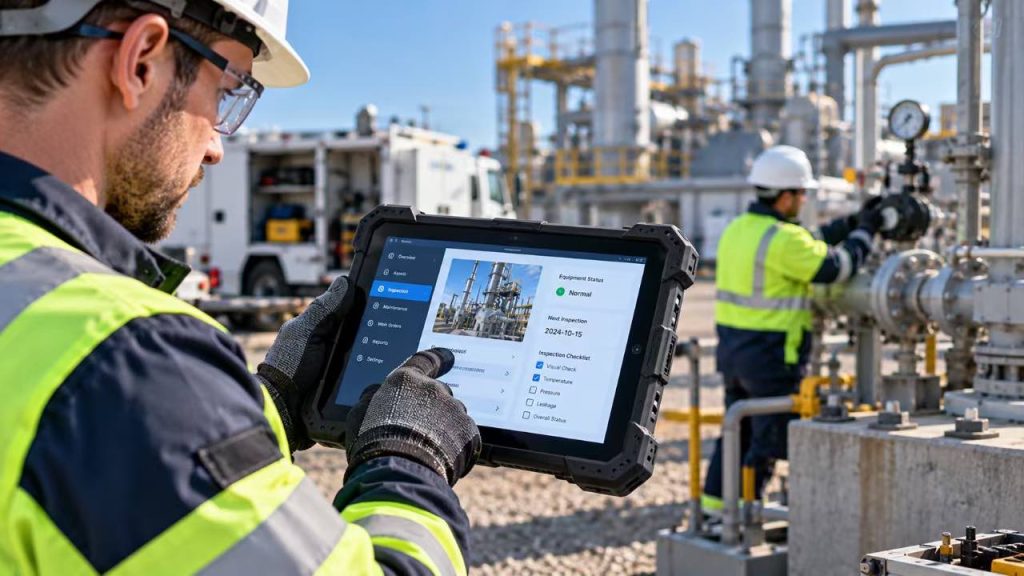
4. Outdoor Field Service and Utility Inspections
Outdoor field service and utility inspection teams often use rugged tablets for equipment inspections, asset management, maintenance reporting, mapping, and field data collection.
These applications may require high screen brightness for sunlight readability, continuous GPS operation, cellular communication, and the use of cameras or specialized peripherals.
Because outdoor workers may have limited access to charging facilities, battery capacity and verified runtime are particularly important.
Removable batteries and compatible spare battery solutions can provide additional flexibility for extended field assignments when supported by the selected device.
Buyers should also consider operating temperature requirements, since cold and hot environments can affect battery performance and charging behavior.
Battery testing should reflect the actual display brightness, network conditions, applications, and environmental conditions expected during field operations.
5. Construction Sites and Remote Industrial Operations
Rugged tablets used on construction sites and remote industrial projects may support site inspections, equipment tracking, project documentation, digital drawings, and communication between field teams.
In these environments, workers may operate far from fixed charging stations and encounter changing weather, dust, vibration, and temperature conditions.
Long operating periods away from external power can make battery planning especially important.
Depending on the deployment, extended-capacity batteries, approved spare batteries, and compatible vehicle charging solutions may help maintain device availability.
However, battery capacity should be evaluated together with device weight, portability, charging logistics, and the practical availability of spare power sources.
For remote operations, organizations should establish a reliable charging and battery replacement plan before deploying rugged tablets at scale.
6. How to Match Battery Solutions to Your Application
Selecting the right rugged tablet battery solution requires an understanding of how the device will be used throughout the working day.
Industrial buyers should begin by identifying the required operating time, typical application workload, display brightness, wireless connectivity, and peripheral usage.
The next step is to determine whether employees have regular access to charging stations, vehicle power, spare batteries, or powered docking equipment.
For mobile operations with limited charging access, greater battery capacity or compatible removable battery options may be valuable. For fixed or vehicle-mounted applications, approved external power solutions may provide a more efficient approach.
Before making a final purchasing decision, businesses should test sample devices under realistic working conditions and confirm the availability of compatible charging accessories and replacement batteries.
Rugged Tablet Battery Requirements by Industry
| Application | Typical Power Demands | Battery Planning Priority | Recommended Solution |
|---|---|---|---|
| Warehouse Management | Wi-Fi, barcode scanning, WMS applications | Full-shift operation and multi-shift availability | Verified shift runtime; spare batteries or hot-swap if supported |
| Logistics & Transportation | GPS, cellular data, route management | Mobile runtime and charging access | Compatible vehicle chargers and sufficient portable battery capacity |
| Manufacturing | MES applications, inspections, production monitoring | Reliable access to production information | Verified mobile runtime or powered docking stations |
| Outdoor Field Service | High-brightness display, GPS, cellular connectivity | Extended operation away from charging facilities | Appropriate battery capacity and compatible spare batteries |
| Construction Sites | Digital drawings, documentation, wireless communication | Remote charging access and portability | Extended battery options and planned charging arrangements |
| Remote Industrial Operations | Inspection software, connectivity, variable temperatures | Power availability and environmental conditions | Tested runtime, approved spare power, and charging strategy |
Note: Battery requirements depend on actual workloads, operating conditions, and device configurations. Recommended solutions are general planning guidance, not guaranteed specifications for any particular model.
Quick Recommendation
Choose rugged tablet battery solutions based on the specific requirements of your industrial application rather than battery capacity alone.
For warehouse operations, prioritize verified full-shift runtime and practical spare battery management. For logistics and vehicle-based applications, consider compatible vehicle charging and powered docking solutions. For outdoor field service and remote operations, evaluate battery capacity, environmental conditions, and access to spare power sources.
Before purchasing rugged tablets in volume, test sample devices with your actual applications, connectivity settings, display brightness, and peripherals to confirm that the selected battery solution meets your daily operational requirements.
Part 9:How to Choose the Right Rugged Tablet Battery Solution
Choosing the right rugged tablet battery solution requires more than comparing battery capacity or manufacturer-rated runtime. For industrial buyers, the most suitable configuration depends on daily workloads, operating environments, charging infrastructure, and long-term maintenance requirements.
A rugged tablet used for warehouse inventory management may require a different battery strategy from one deployed for outdoor inspections, logistics transportation, or manufacturing operations.
Before purchasing rugged tablets for an industrial project, buyers should evaluate the following factors to ensure the selected battery solution supports reliable operation, practical charging, and long-term deployment needs.
1. Define Your Required Working Hours
The first step in selecting a rugged tablet battery is to determine how long the device must operate between charging opportunities.
Consider whether employees work standard 8-hour shifts, extended 10-hour or 12-hour shifts, or multiple consecutive shifts.
It is also important to identify how frequently the tablet will be used during each shift. Continuous screen operation, barcode scanning, GPS tracking, and wireless communication can create different power demands from occasional data entry.
For critical industrial workflows, buyers should plan for a reasonable battery reserve rather than selecting a device whose estimated runtime only matches the exact shift duration.
If charging opportunities are limited, removable batteries, compatible spare batteries, or approved external power solutions may be necessary.
2. Compare Battery Capacity and Real-World Runtime
Battery capacity is an important specification, but it should not be the only factor used to compare rugged tablets.
When possible, compare battery energy in watt-hours (Wh) rather than relying solely on milliampere-hour (mAh) ratings, especially when devices use different battery voltages.
Actual battery runtime also depends on processor efficiency, screen brightness, application workloads, wireless connectivity, and connected peripherals.
Industrial buyers should request information about the conditions used for manufacturer-rated battery life, including display brightness, network settings, and test workloads.
For larger deployments, testing sample devices with the intended applications provides a more reliable basis for selecting the appropriate battery configuration.
3. Evaluate Removable and Hot-Swappable Battery Options
Battery replacement design can influence operational flexibility, especially when rugged tablets are used throughout extended work shifts.
Removable batteries allow compatible spare batteries to be used when the main battery is depleted, but some devices require a complete shutdown before replacement.
Hot-swappable battery systems, when specifically supported by the tablet, allow battery replacement without a normal system shutdown. This can help reduce interruptions in warehouse, logistics, and field service workflows.
Buyers should confirm whether the selected rugged tablet supports removable batteries, true hot-swapping, or both.
It is also important to verify battery replacement procedures, backup power limitations, spare battery availability, and any environmental protection requirements associated with battery replacement.
4. Check Charging Accessories and Power Compatibility
A practical charging strategy is essential for maintaining rugged tablet availability during daily industrial operations.
Depending on the application, businesses may require standard power adapters, spare battery chargers, multi-bay charging docks, vehicle chargers, or powered docking stations.
For warehouse and manufacturing operations, centralized charging stations can help teams manage devices and spare batteries between shifts.
For transportation and field service applications, compatible vehicle charging or powered mounting solutions may reduce dependence on battery capacity alone.
Before purchasing, buyers should confirm charging connector types, supported input voltage, accessory compatibility, charging time, and the availability of approved replacement chargers.
Charging accessories should always be selected according to the specific rugged tablet model and manufacturer requirements.
5. Consider Operating Temperature and Battery Durability
Industrial rugged tablets are often used in environments where temperature, vibration, dust, and moisture can affect daily operations.
Battery performance may change under very cold or hot conditions, and charging may be restricted outside the battery’s approved temperature range.
For outdoor field service, cold storage facilities, construction sites, and industrial inspection projects, buyers should verify the device’s operating temperature range as well as the battery’s charging and storage requirements.
It is also important to confirm whether battery replacement procedures preserve the tablet’s intended ingress protection when performed correctly.
Environmental protection ratings and durability claims should be evaluated using the specifications and test documentation for the exact rugged tablet model, rather than assumed from the general product category.
6. Evaluate Long-Term Maintenance and Total Cost of Ownership
For industrial buyers purchasing rugged tablets in volume, battery-related costs extend beyond the initial device price.
Long-term expenses may include replacement batteries, spare charging accessories, maintenance labor, device downtime, and battery disposal or recycling.
A lower-priced tablet may not provide the best long-term value if battery replacement is difficult, compatible spare parts are unavailable, or charging limitations interrupt daily operations.
Before selecting a supplier, buyers should ask about battery warranty terms, replacement procedures, spare battery availability, charging accessories, and expected product support.
Evaluating these factors alongside verified runtime and operational requirements can help businesses select a more practical rugged tablet battery solution for long-term industrial deployment.
Battery performance is only one factor in selecting an industrial device. For a complete evaluation of durability, performance, connectivity, and application requirements, read our guide on how to choose the right rugged tablet.
Rugged Tablet Battery Selection Checklist for Industrial Buyers
| Evaluation Factor | What to Check | Questions to Ask the Supplier | Why It Matters |
|---|---|---|---|
| Required Runtime | Shift length and workload | Can the device support our required shift under realistic conditions? | Helps reduce charging interruptions |
| Battery Capacity | Wh, mAh and nominal voltage | What is the battery energy capacity in Wh? | Enables more accurate battery comparisons |
| Battery Design | Built-in, removable or hot-swappable | Can batteries be replaced without shutting down the tablet? | Supports appropriate replacement planning |
| Charging Accessories | Chargers, docks and vehicle power | Which approved charging accessories are available? | Supports reliable daily charging |
| Environmental Conditions | Operating and charging temperatures | What are the approved temperature ranges? | Helps avoid unsuitable deployments |
| Battery Maintenance | Replacement process and spare parts | Are compatible replacement batteries available? | Supports long-term device maintenance |
| Testing and Verification | Runtime test conditions | Can we test a sample with our applications? | Provides evidence for purchasing decisions |
| Total Cost of Ownership | Battery, charging and service costs | What are the long-term battery support and warranty terms? | Improves long-term cost planning |
Note: This checklist provides general purchasing guidance. Battery capabilities, charging accessories, environmental ratings, and service terms vary by model and supplier. Verify all requirements before placing a bulk order.

Quick Recommendation
When selecting a rugged tablet battery solution, evaluate actual working hours, battery energy capacity, real-world runtime, charging infrastructure, and long-term maintenance requirements together.
For demanding industrial deployments, confirm whether removable batteries, hot-swappable battery systems, spare chargers, or powered docking stations are available for the specific model.
Before placing a bulk order, request detailed specifications and test sample devices under realistic workloads. A well-matched battery solution should support reliable daily operation, practical charging, and manageable long-term ownership costs.
Frequently Asked Questions About Rugged Tablet Battery Life
Industrial buyers often have questions about rugged tablet battery life, charging time, removable batteries, and performance under demanding operating conditions.
The following frequently asked questions provide practical guidance for evaluating rugged tablet battery performance and selecting a suitable power solution for industrial applications.
Rugged tablet battery life varies by model, battery capacity, processor, screen brightness, and application workload. Some devices are designed to support a standard work shift, while others offer extended battery configurations.
For industrial applications, buyers should compare manufacturer-rated runtime with actual performance under typical working conditions, including wireless connectivity, scanning, and display usage.
A rugged tablet may support an 8-hour work shift if its battery capacity and power consumption are appropriate for the intended workload.
However, continuous high-brightness display usage, GPS, cellular connectivity, barcode scanning, and demanding applications can reduce actual runtime.
Businesses should test devices under realistic operating conditions and allow a reasonable battery reserve to reduce unexpected interruptions.
Milliampere-hours (mAh) measure electrical charge capacity, while watt-hours (Wh) measure stored battery energy.
Because battery voltage can vary between devices, Wh is generally more useful when comparing the energy capacity of different rugged tablet batteries.
Battery energy can be estimated using the formula: Wh = mAh × V ÷ 1000.
Actual operating time also depends on the device's power consumption and working conditions.
Some rugged tablets support hot-swappable batteries, allowing a compatible battery to be replaced without a normal system shutdown.
However, not every rugged tablet with a removable battery supports hot-swapping.
Before purchasing, buyers should verify the specific model's hot-swap capability, backup power limitations, battery replacement procedures, and compatible spare battery options.
Rugged tablet charging time depends on battery capacity, charger output, battery condition, temperature, and the device's charging system.
A larger battery does not necessarily require proportionally longer charging time if the device supports an appropriate charging system.
Industrial buyers should request the charging specifications for the exact tablet model and verify compatibility with approved adapters, battery chargers, or docking stations.
Yes. Low temperatures can temporarily reduce the available energy and power output of many rechargeable batteries, which may shorten rugged tablet runtime.
Charging may also be restricted at low temperatures to protect the battery.
For outdoor inspections, cold storage, and winter field operations, buyers should verify the device's operating temperature range and the battery's approved charging conditions.
To improve rugged tablet battery runtime, adjust screen brightness, use suitable power management settings, disable unnecessary wireless functions, and reduce nonessential background applications.
Regular battery maintenance and manufacturer-approved charging practices can also help support long-term battery reliability.
For business-critical applications, test power-saving settings carefully to ensure they do not interrupt essential software, communications, or safety functions.
A rugged tablet battery may need replacement when its usable capacity has declined enough to affect required working hours, when diagnostic tools indicate significant battery deterioration, or when the manufacturer recommends replacement.
Batteries showing swelling, physical damage, overheating, or other abnormal conditions should be removed from service according to the manufacturer's safety guidance.
For industrial deployments, periodic battery health checks and access to approved replacement batteries can help reduce unexpected downtime.
Quick Recommendation
Rugged tablet battery life should always be evaluated according to actual industrial workloads rather than advertised runtime alone.
Before purchasing, confirm battery capacity, charging requirements, operating temperature limits, and the availability of removable or hot-swappable battery options for the specific device model.
For business-critical deployments, test sample tablets under realistic working conditions to ensure the selected battery solution supports daily operational requirements.
Conclusion: Choosing the Right Rugged Tablet Battery for Your Business
Rugged tablet battery life is an important factor in maintaining productivity and reducing operational interruptions across industrial environments. However, the best battery solution is not necessarily the one with the highest capacity or the longest advertised runtime.
For industrial buyers, selecting the right rugged tablet requires a balanced evaluation of battery capacity, actual power consumption, working conditions, charging options, and long-term maintenance requirements.
1. Battery Life Should Match Real Industrial Workloads
A rugged tablet used for warehouse management may have different battery requirements from one used for outdoor inspections, logistics transportation, or manufacturing operations.
Instead of relying only on published battery specifications, businesses should evaluate how screen brightness, wireless connectivity, application workloads, and peripheral devices affect actual operating time.
The goal is to select a battery configuration that supports the required work shift with an appropriate power reserve.
2. Battery Design and Charging Flexibility Matter
Battery capacity is only one part of a reliable industrial power strategy.
Depending on the application, removable batteries, verified hot-swappable battery systems, spare battery chargers, vehicle chargers, and powered docking stations may provide additional operational flexibility.
Businesses should confirm which battery and charging options are supported by the specific rugged tablet model before purchasing.
3. Test Before Making a Bulk Purchasing Decision
For industrial projects and large-scale deployments, practical testing is one of the most effective ways to evaluate rugged tablet battery performance.
Testing sample devices under realistic conditions can help buyers understand actual runtime, charging requirements, and compatibility with essential applications and accessories.
A well-matched battery solution can support more reliable daily operations while helping organizations manage downtime, maintenance requirements, and long-term ownership costs.
Key Takeaways
1. Prioritize Real-World Runtime
Choose a rugged tablet based on actual working hours, application workloads, and operating conditions rather than advertised battery life alone.
2. Compare Battery Energy and Efficiency
Consider watt-hours (Wh), device power consumption, and verified runtime when comparing battery configurations.
3. Plan for Charging and Battery Replacement
Evaluate removable batteries, hot-swappable options, spare chargers, and powered docking solutions according to your operational needs.
4. Verify Performance Before Deployment
Test sample devices with your applications, wireless connections, display settings, and peripherals before placing a bulk order.
INDUSTRIAL RUGGED TABLETS
Need a Rugged Tablet for Your Industrial Project?
Tell us about your application, required battery runtime, and charging preferences. Our team can help you explore suitable rugged tablet configurations for your project.
OEM / ODM · B2B Project Inquiries
- Application-Based Selection
- Battery & Charging Options
- Project Consultation